For shipping, freight & commodity professionals

The desk doesn't need another chat log. It needs the brief.

Outbrief turns a conversation with ChatGPT, Claude or Gemini into a document you can send — a Market Memo, Charter Checklist or Client Brief. Dated, structured, and flagged wherever the figures aren't verified.

One-time $39 No account No subscription Bring your own model key
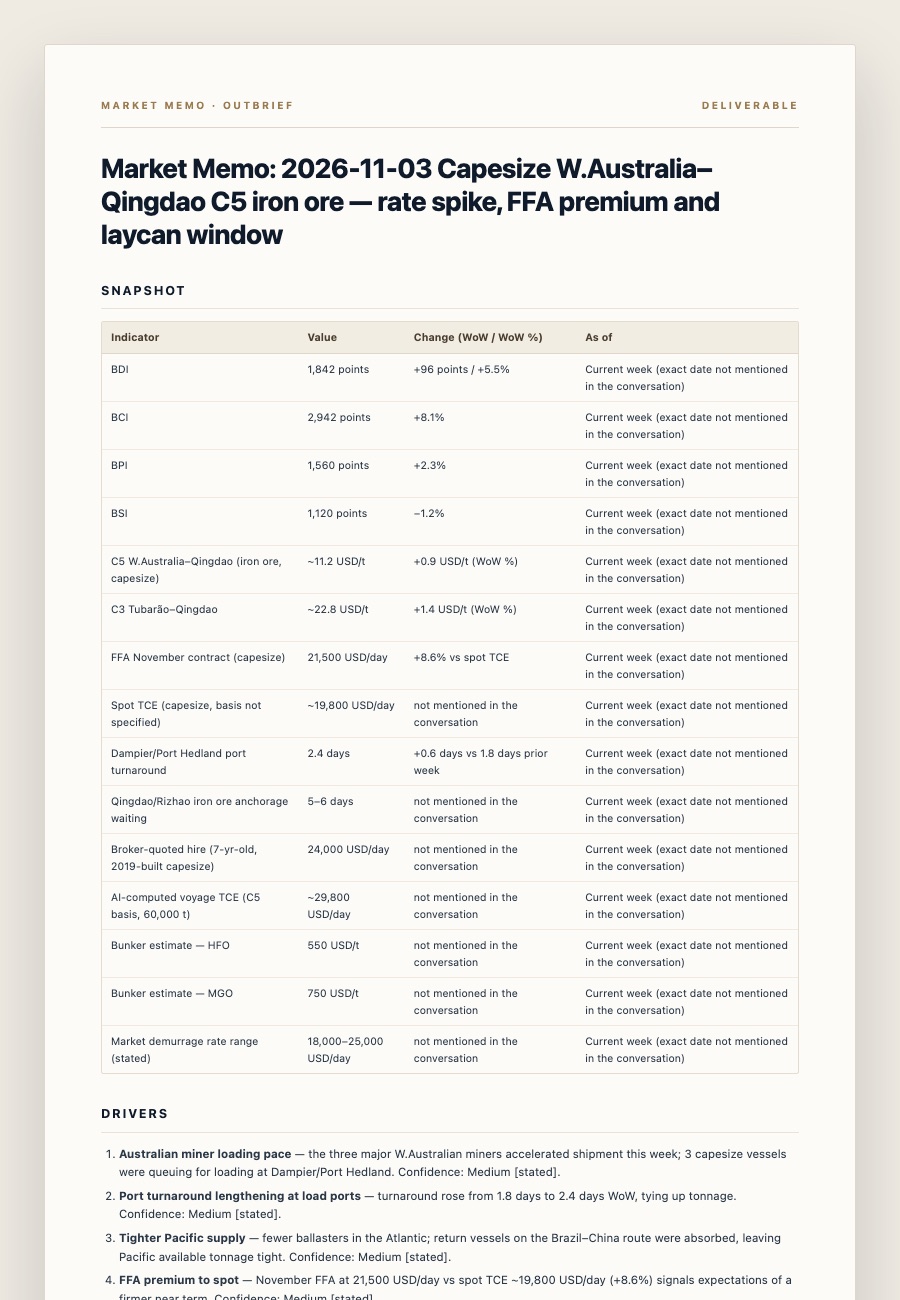
Generated Market Memo: snapshot table, drivers and data caveats
Market Memo · generated deliverablePDF / MD
The last mile

Export was the easy part. The deliverable was missing.

A chat gives you an answer. The desk needs a document: a dated market note, a charter decision sheet, a client brief. Re-typing it is the tax you pay for using AI — and the place where numbers quietly drift.

01

Paste the conversation

Any chat you can copy: rates, laycan windows, TCE math, port congestion, demurrage terms. No integration, no upload, no account.

02

Pick the document

Market Memo for a desk note. Charter Checklist for a fixture decision. Client Brief for something you can forward without editing.

03

Send it

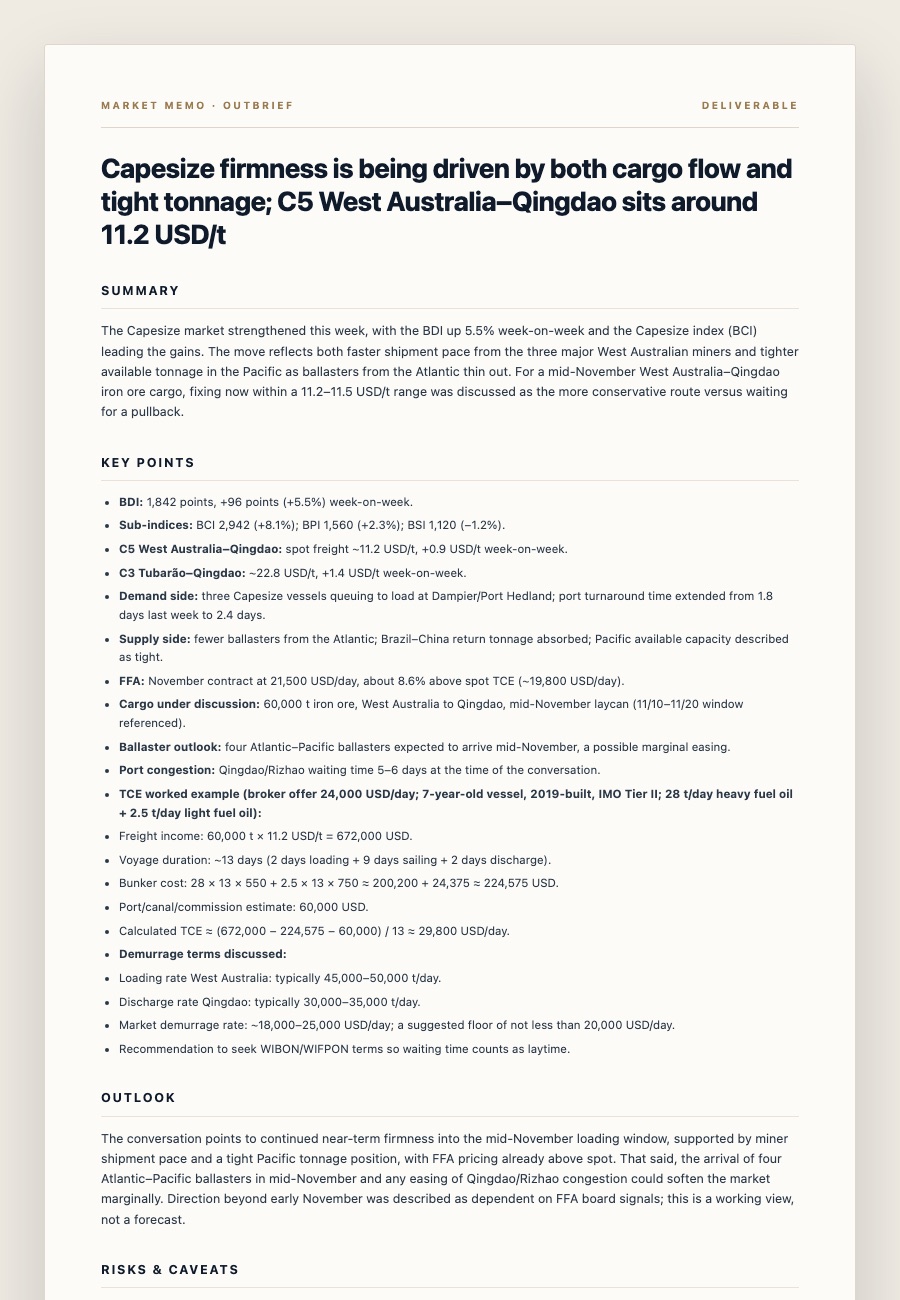
Markdown for the record, PDF for the client. Frontmatter, date, tags and a separated list of figures still to verify.

The deliverables

Three documents. One paste.

Each template encodes the structure a shipping professional would write by hand — not generic formatting. All three are included in the $39 lifetime licence.

Market Memo example
Market Memo

A dated, citable desk note

Snapshot table, drivers with confidence, timeline, conclusion and follow-ups — with every unsourced number separated out.

BDI · BCI/BPI/BSI · C5/C3 · FFA · TCE · port turnarounds
Included · $39 lifetime
Charter Checklist example
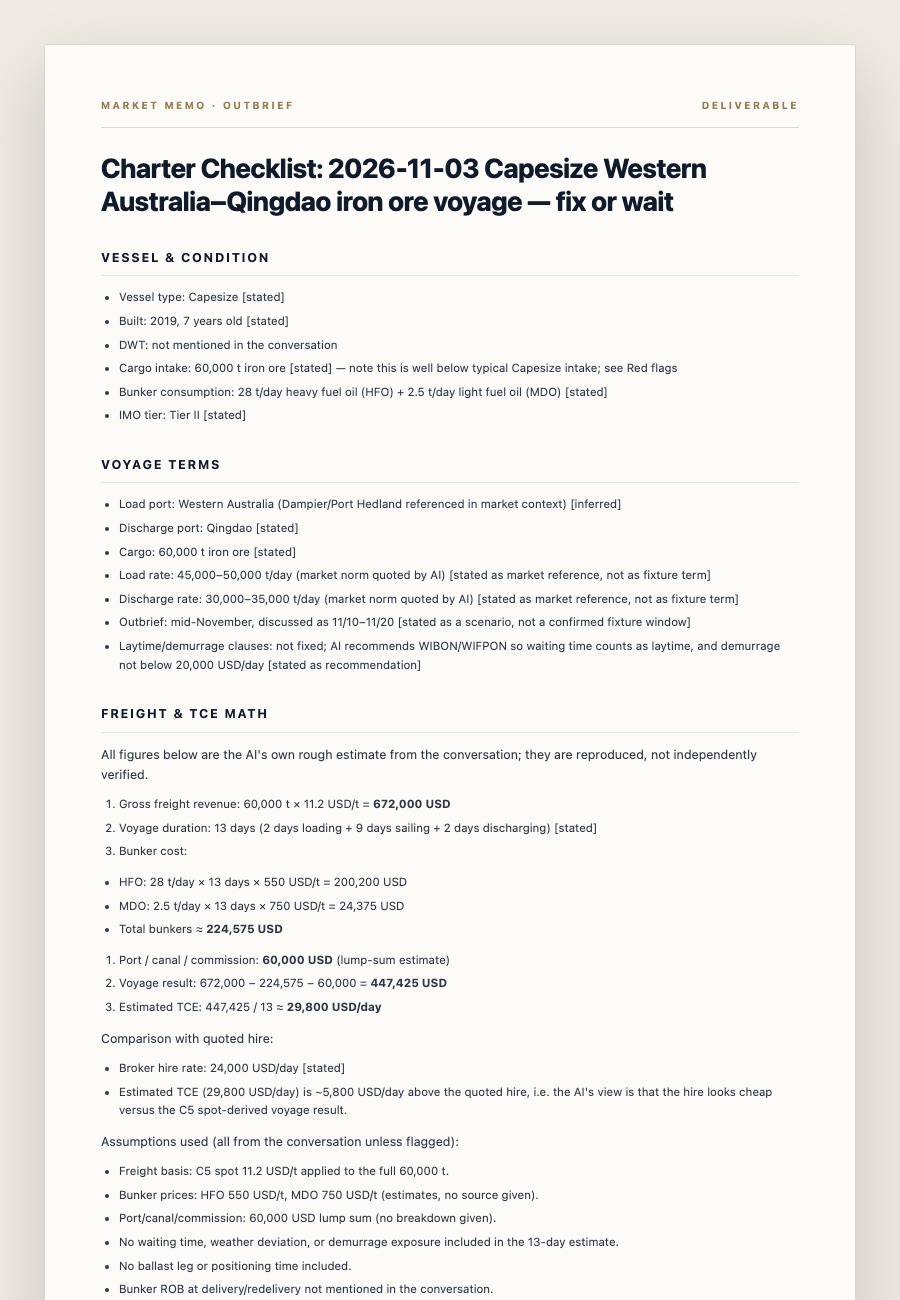
Charter Checklist

“Should I fix this vessel?”

Vessel profile, voyage terms, step-by-step TCE math, a risk register, red flags and the open questions to settle before fixing.

Vessel · laycan · load/discharge · demurrage · risk register
Included · $39 lifetime
Client Brief example
Client Brief

Clean enough to forward

Headline, summary, key points, outlook and a caveats section — internal hesitation stays out, unverified figures stay flagged.

Headline · summary · key points · outlook · disclaimer
Included · $39 lifetime
Built-in provenance

Nothing invented. Everything traceable.

The value of a shipping document is not that it reads well. It's that you can defend the numbers in it. Outbrief treats provenance as structure, not a disclaimer.

I

Figures stay where they came from

Numbers that appear in the conversation stay in the body. Anything without a stated source is moved into Data caveats & items to verify, with ⚠️ and the reason.

II

“Unverified” is a feature

Drivers are labelled stated or inferred — so a reader knows what was said versus what the model concluded.

III

Units normalized, assumptions exposed

USD/t, USD/day, knots and days are standardised. TCE math is shown step by step, so the arithmetic can be checked later.

Detail from a generated Market Memo showing the data caveats section
Every unsourced figure is listed, not smoothed over.
Data caveatsC5 WoW percentage not given in the conversation — stated as absolute change only.
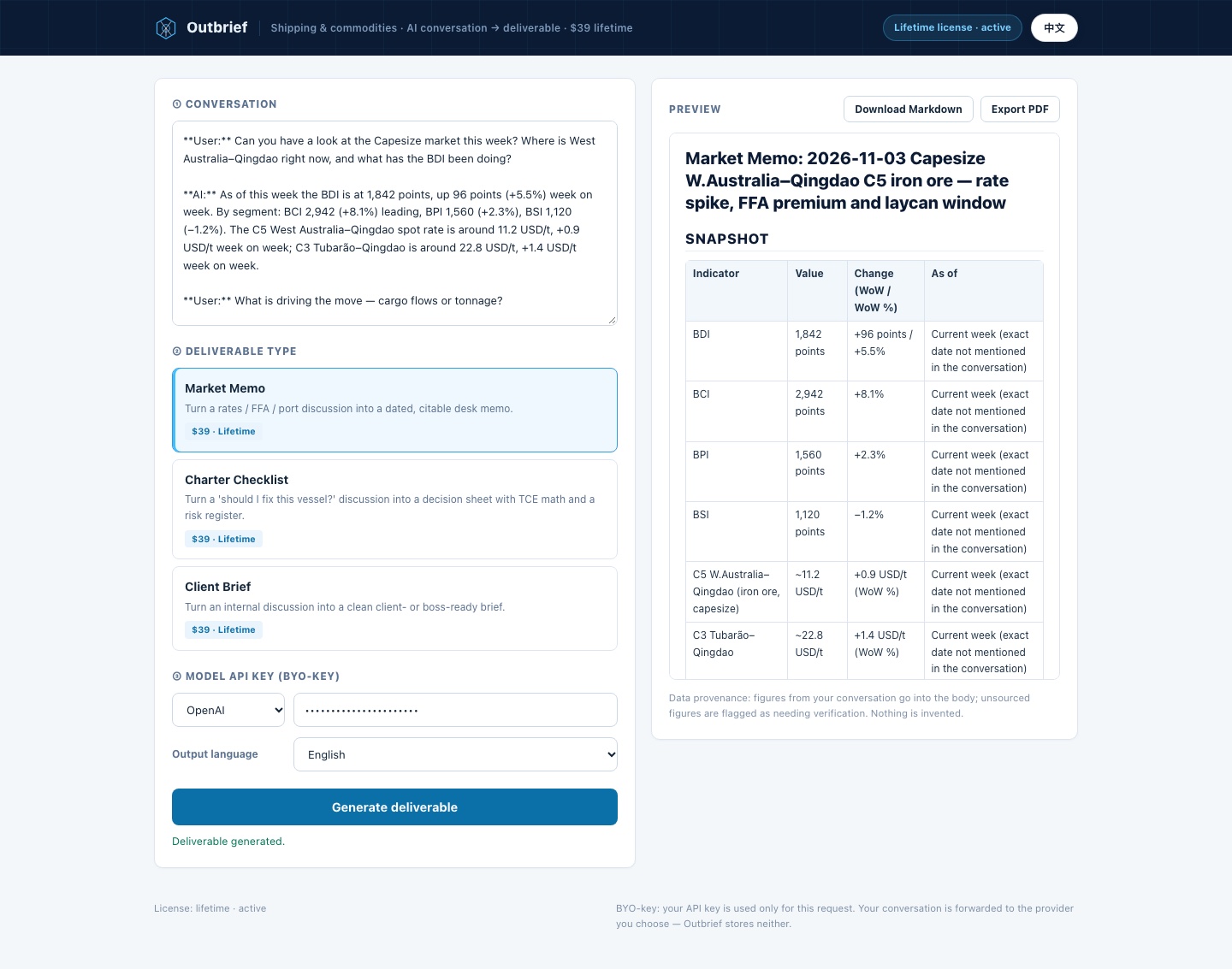
The Outbrief tool: paste a conversation, choose a deliverable, export
The tool

One page. No setup. No account.

Activate the licence, paste your model key, and generate. Outbrief forwards the conversation to the provider you chose — OpenAI, Anthropic or DeepSeek — and never stores it.

  • Bring your own key. You pay the model provider directly — no token markup, no server-side AI bill to pass on.
  • Markdown and PDF. Download the Markdown or print a clean A4 PDF from the browser — no extra app.
  • English and Chinese. Interface in English or 简体中文, and the deliverable can follow the conversation's language or be forced to either.
Pricing

One price. Yours forever.

No subscription, no per-seat fee, no token meter on the product side.

Outbrief · Lifetime
$39one-time
Lifetime licence.
Activate on this device.
No recurring charge.
  • All three deliverables — Market Memo, Charter Checklist, Client Brief
  • Markdown + print-ready PDF export
  • Data provenance and caveat separation built in
  • Your own API key — you pay only the model tokens you use
  • Free updates for life
Buy once — $39
Secure checkout by Creem. Your licence key arrives by email.
Already have a key? Activate it in the tool →
◆Bring your own key. Outbrief runs the conversion through your OpenAI, Anthropic or DeepSeek key. Conversations are never stored on our servers — only forwarded to the provider you choose, so there is no server-side AI bill for us to pass on to you.
Questions

Answered straight.

Which AI platforms does it work with?
Any chat you can copy text from — ChatGPT, Claude, Gemini, Grok, DeepSeek. You paste the transcript; Outbrief structures it. Generation runs through your own OpenAI, Anthropic or DeepSeek API key.
Where does my data go?
The conversation is sent to the model provider you chose, using your key. Outbrief itself stores nothing and hosts no conversation data. Your API key is used only for that request and is never stored on our servers.
What makes this different from an export extension?
Exporters produce files. Outbrief produces deliverables with industry structure: data caveats separated from verified figures, units normalised, and decision fields (TCE, laycan, demurrage) extracted and organised — the layer between “I chatted about it” and “I can send this to a client”.
Is the output a market recommendation?
No. Outbrief organises and structures what was discussed. Figures from your conversation are marked as unverified where they lack a source. It is a workflow tool, not advice or a data service.
What does the $39 include, and how does activation work?
A lifetime licence for all three deliverables, Markdown and PDF export, and free updates. After checkout Creem emails your licence key; enter it once in the tool to activate this device. There is no subscription and no account to create.
Do I have to pay again if I change computers?
No. Your licence key is the credential — there is no account to create. Open the tool on the new device, enter the same key, and activate there. Creem records each activation against the key; if you reach the device limit, use “Deactivate this device” in the tool (or email hello@outbrief.dev) to free a slot.
What if I lose my licence key?
Your key is in the Creem receipt email from your purchase. If you can’t find it, email hello@outbrief.dev with the purchase email address and we’ll resend it. No account or password is needed.
Can I use it offline or with local models?
Outbrief is a web tool: you need a browser, internet access and a model API key. The conversation and key never touch our storage, but the generation itself runs through the provider you choose.
From conversation to document

Bring the conversation. Leave with the brief.

Open the tool, paste a chat, pick a template. Your first deliverable is minutes away.

One-time $39 · Activate on this device · No account